Axiolex
Centralized Tool Discovery & Execution
Axiolex gives AI clients, custom applications, and custom agents a shared way to discover and execute relevant tools without configuring every downstream provider, endpoint, or credential directly.
- AI Clients — Claude Desktop, Cursor, Codex, and similar MCP clients connect to Axiolex for centralized tool discovery and execution.
- Custom Applications — HR, Legal, IT Services, Supply Chain, and other applications can scope discovery to relevant namespaces and execute matching tools.
- Custom Agents — agents can discover and execute MCP tools, A2A skills, adapter-backed REST capabilities, and local/internal tools through Axiolex.
Explore: GitHub · PyPI · npm gateway
Axiolex in Action
Axiolex gives AI clients, applications, and agents a single gateway to discover and execute tools across MCP, A2A, REST-backed services, and internal tools — returning only the relevant few from a 72-tool catalog.
|
Claude — semiconductor supply chain query
Claude using Axiolex to discover and execute tools for a semiconductor request. 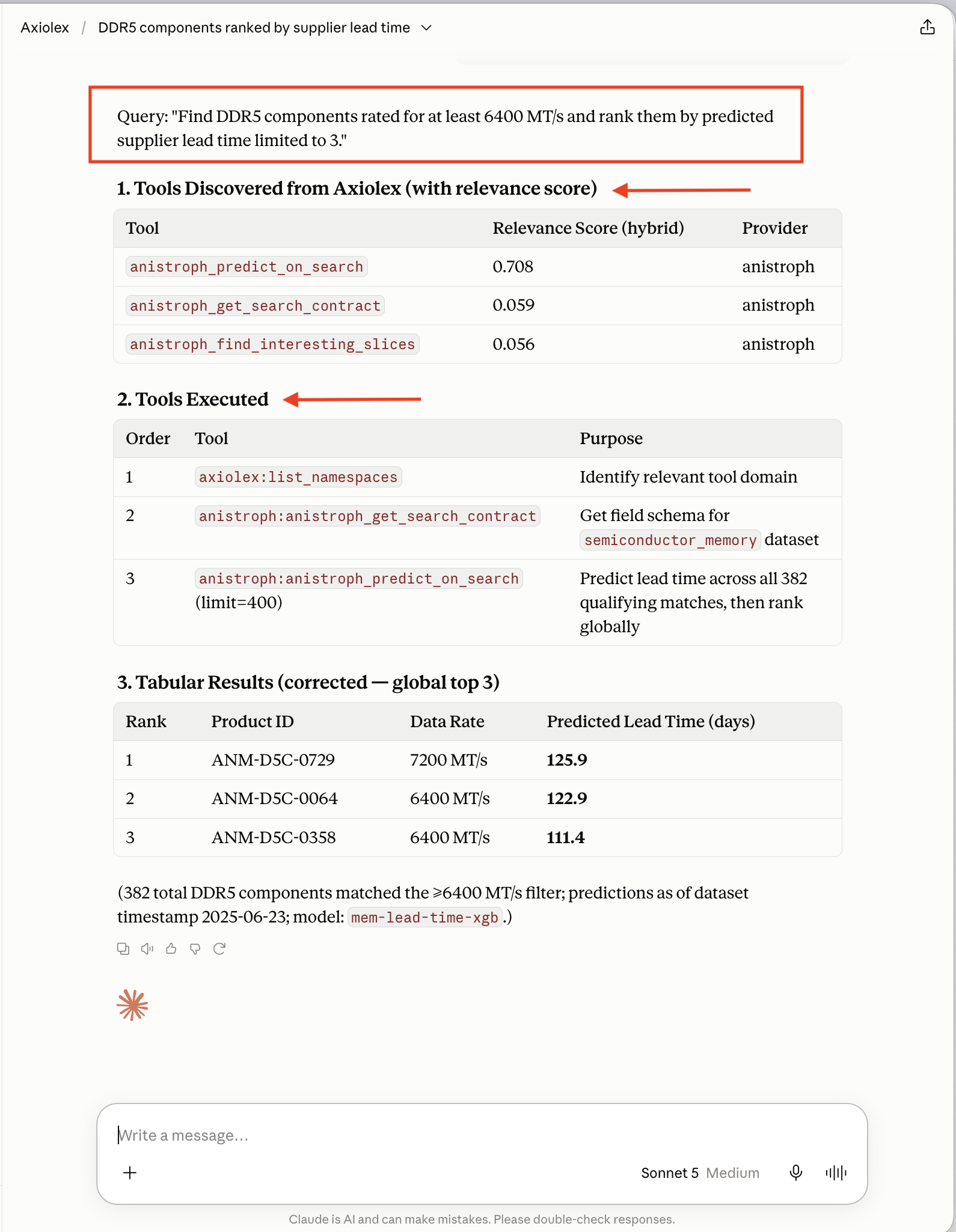
|
Unified tool catalog
MCP, A2A, REST-backed, and internal tools from Anistroph, Aina-Veris, Jira, and Tavily. 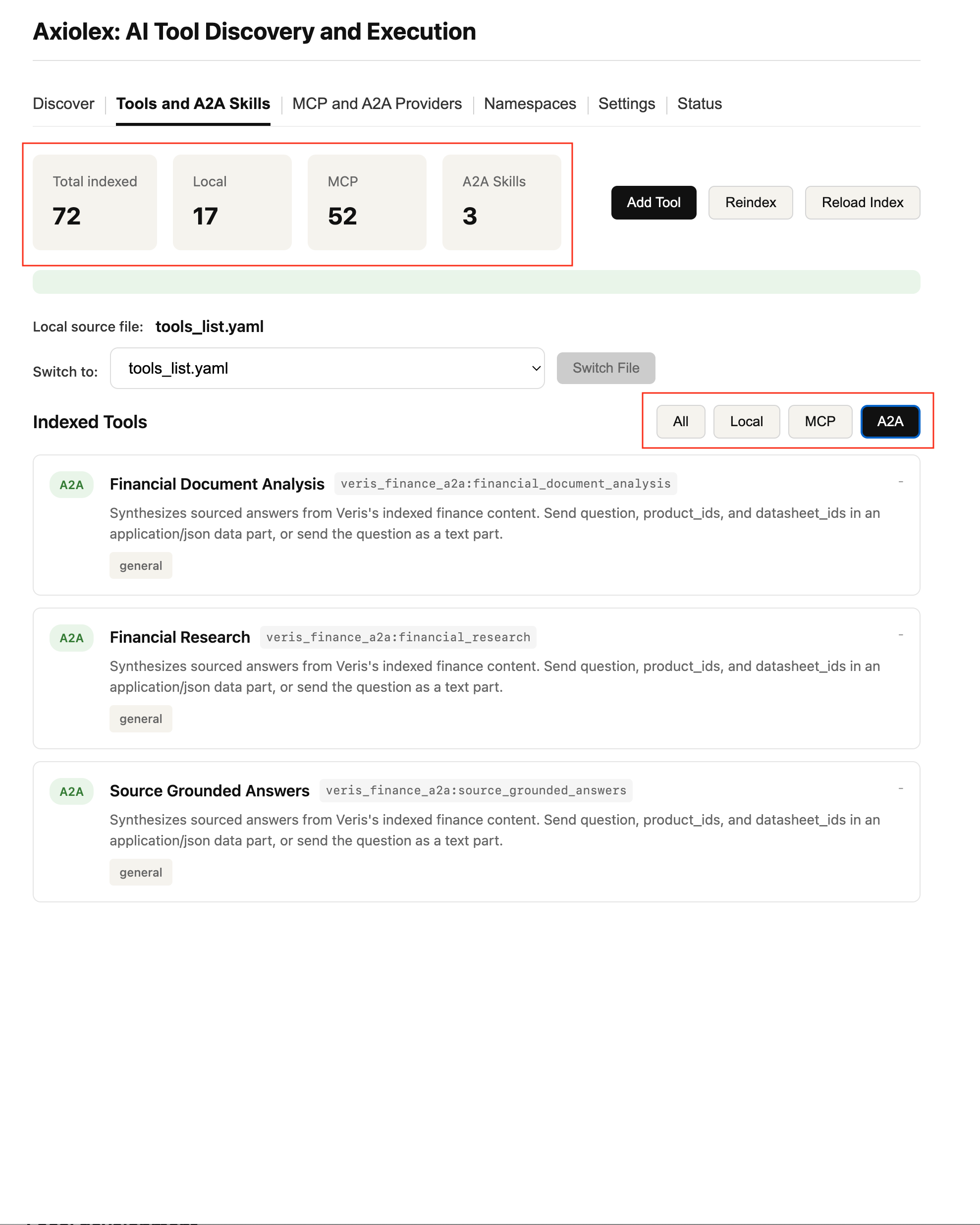
|
|
Codex — creating a Jira ticket
Codex discovers a Jira tool, creates the ticket, returns the linked result. 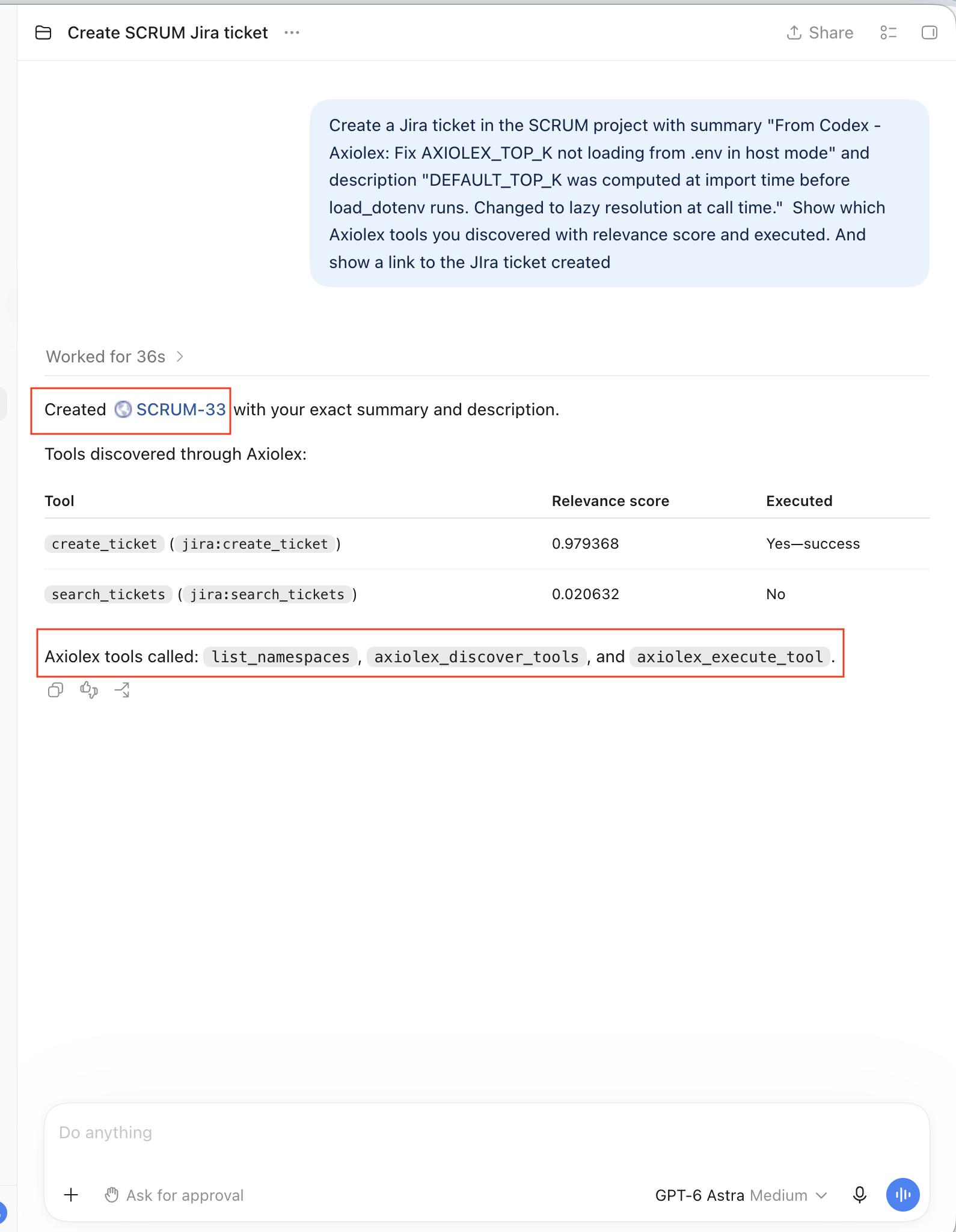
|
Architecture overview
One discovery and execution layer across MCP, A2A, REST, and internal tools. 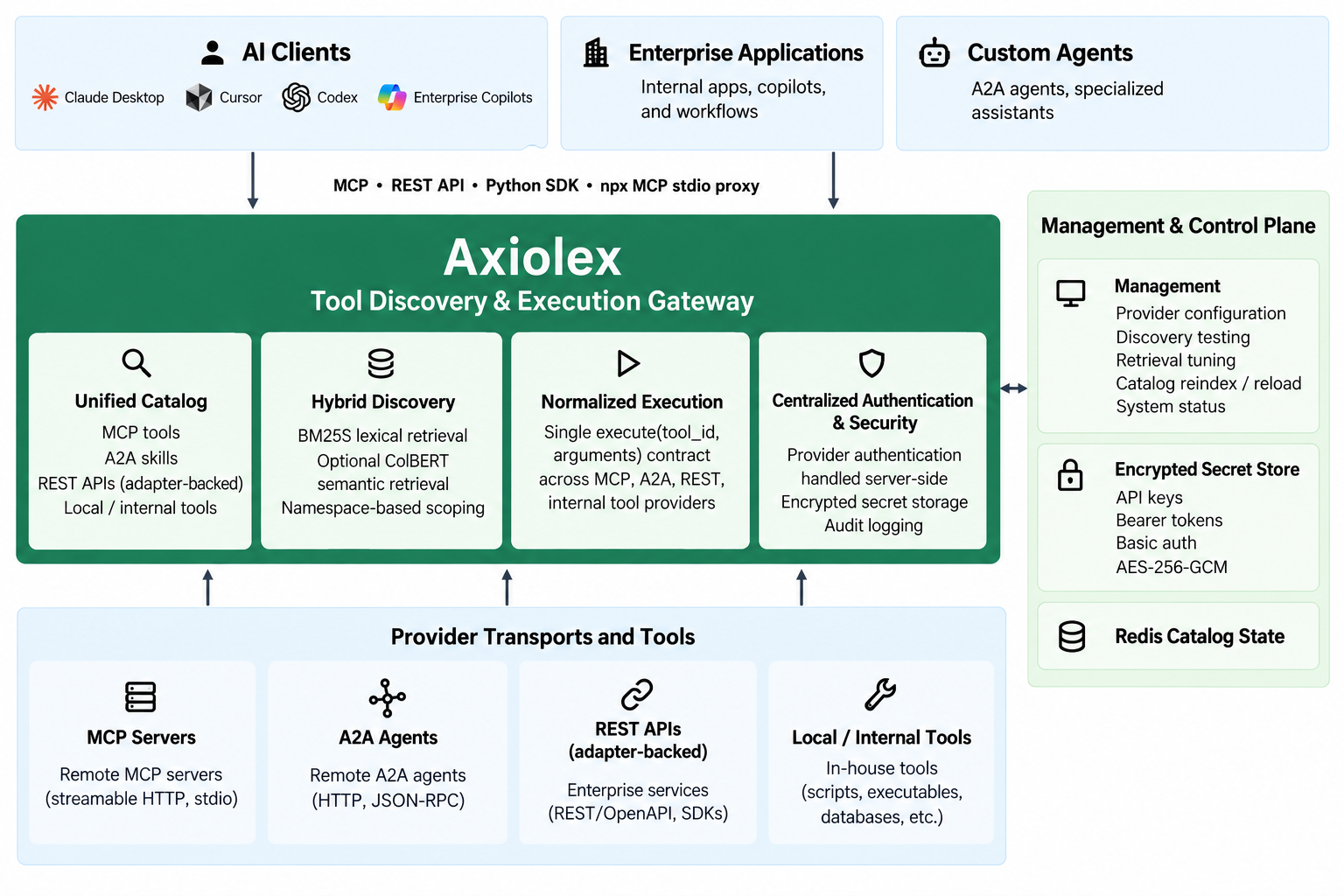
|
|
Discovery UI with namespace scoping
Namespace scoping, Top-K, BM25S/ColBERT weighting, tunable retrieval. 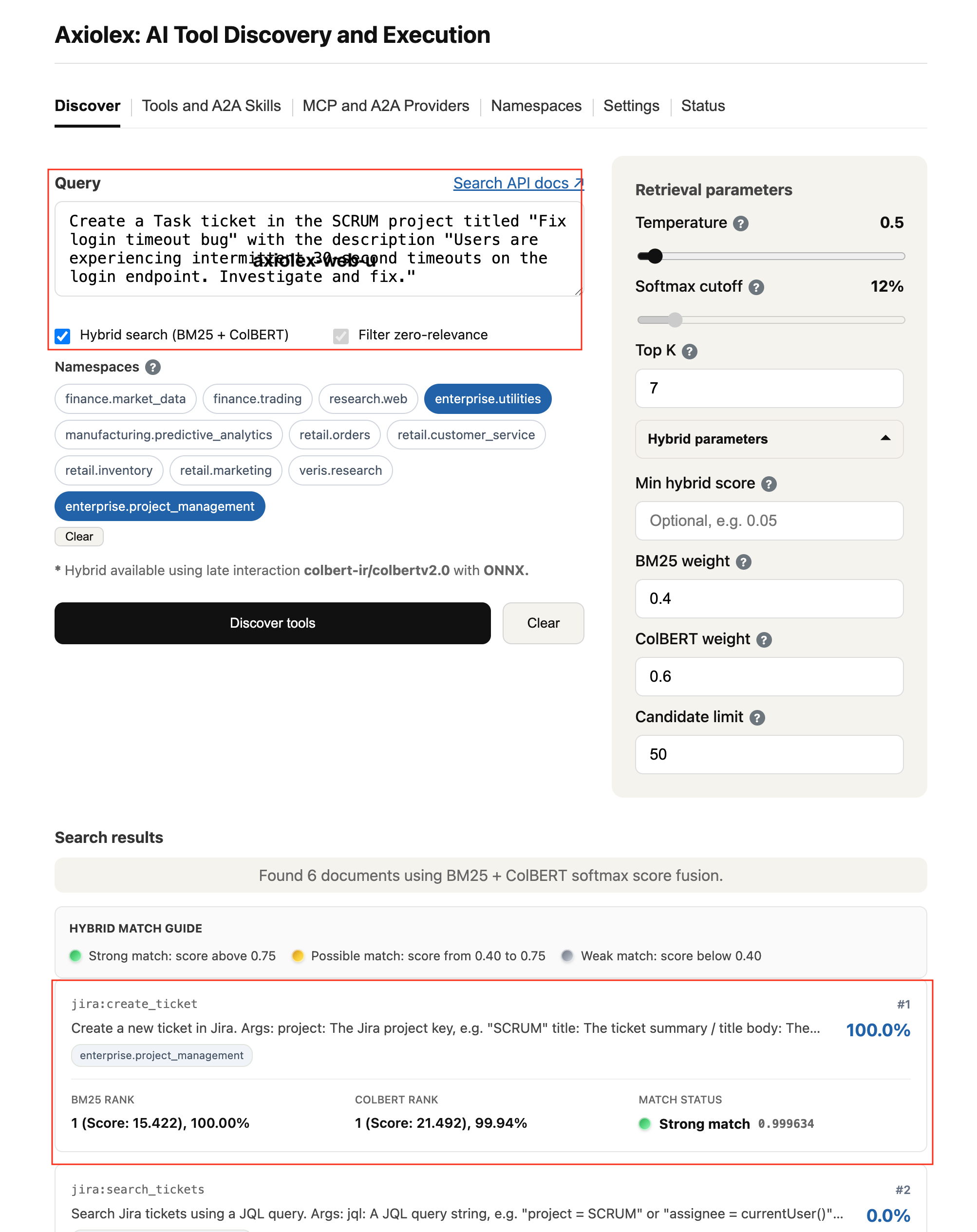
|
Provider registration
Encrypted credentials, namespace assignment, multiple auth types. 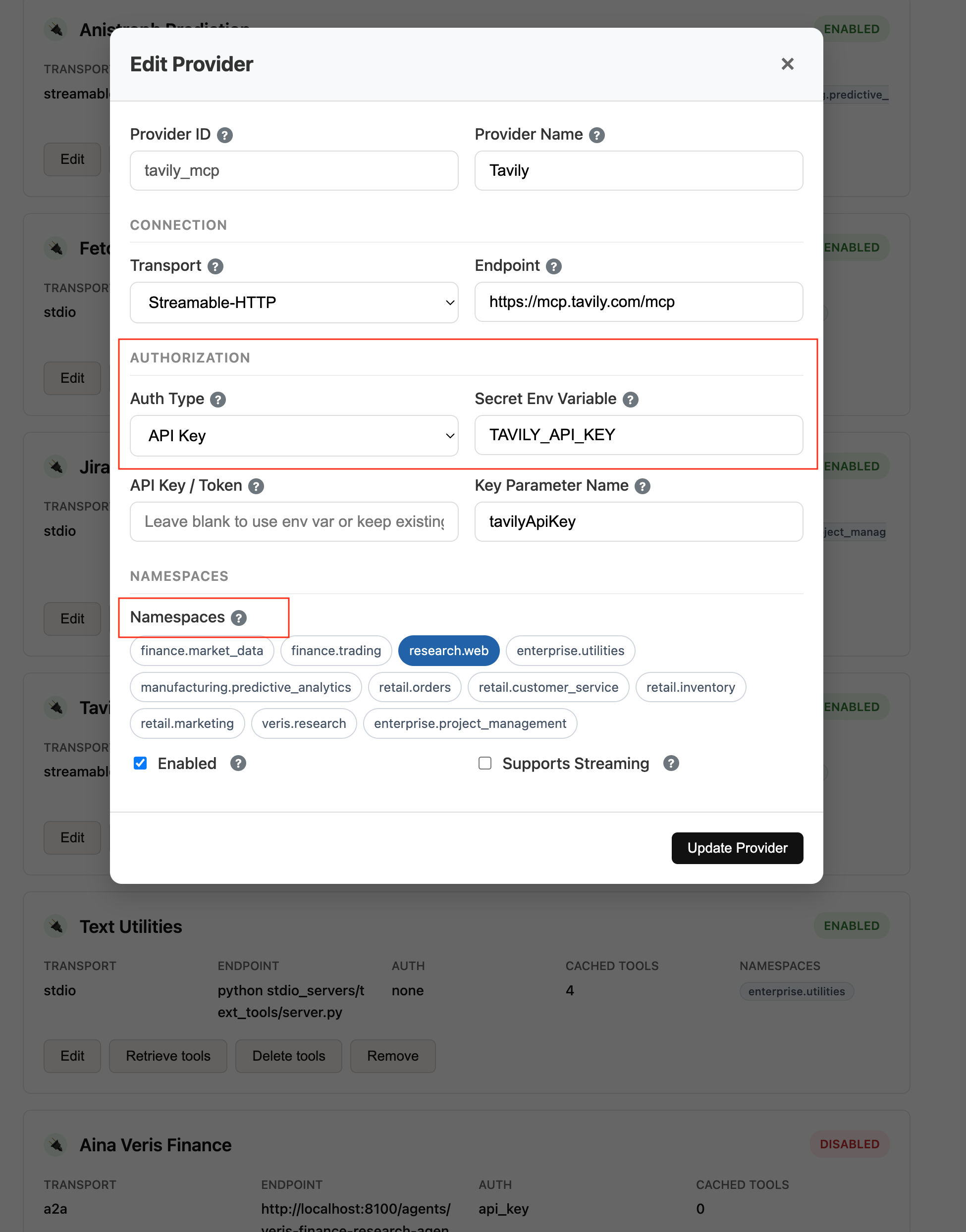
|
Why Axiolex?
As tool catalogs grow, loading every tool definition into every AI client becomes expensive and difficult to manage.
Anthropic documented a five-server setup with 58 tools consuming ~55K tokens before the conversation starts, with Jira alone accounting for ~17K tokens in that example. Anthropic: Advanced Tool Use
The problem is broader than context size:
- Per-client configuration — each AI client can end up maintaining its own provider registrations and endpoints.
- Tool selection — larger catalogs give the LLM more competing capabilities to evaluate.
- Credential duplication — downstream credentials and transport details can be repeated across clients.
- Provider changes — new or updated providers must be made available to each consuming client.
- Mixed transports — MCP, A2A, adapter-backed REST systems, and local tools use different runtime patterns.
Axiolex centralizes catalog management, discovery, ranking, execution, and downstream provider authentication behind stable client interfaces.
Before Axiolex
At the time of writing, AI clients such as Claude Desktop, Cursor, and Codex, as well as custom applications and agents, typically maintain their own connections and configuration for the capabilities they use. AI clients may also maintain their own discovered MCP tool inventory.
AI Clients
Claude Desktop / Cursor / Codex
        ├──► MCP Server A
        ├──► MCP Server B
        └──► MCP Server C

Custom Applications
HR / Legal / IT Services
        ├──► MCP Server A
        ├──► REST Integration
        └──► Internal Tool

Custom Agents
        ├──► MCP Server B
        ├──► A2A Agent
        └──► Internal Tool
Adding or changing a provider for one consumer does not automatically propagate that capability to the others.
With Axiolex
AI Clients ───────────────┐
Custom Applications ──────┼──► Axiolex
Custom Agents ────────────┘      │
                                  ├──► MCP Servers
                                  ├──► A2A Agents
                                  ├──► REST APIs via adapters
                                  └──► Local / Internal Tools
AI clients, custom applications, and custom agents connect to Axiolex through stable interfaces and discover only the capabilities relevant to the current request.
How Axiolex Fits
| Client side | Axiolex | Provider side |
|---|---|---|
| AI Clients — Claude Desktop, Cursor, Codex, similar MCP clients | Unified Catalog | MCP Servers — Streamable HTTP / stdio |
| Custom Applications — HR, Legal, IT Services, other internal apps | Hybrid Discovery — BM25S + optional ColBERT | A2A Agents — Agent Cards + skills |
| Custom Agents | Normalized Execution | REST APIs — adapter-backed |
MCP Streamable HTTP • REST API • Python SDK • npx @axiolex/mcp-gateway |
Provider authentication handled server-side | Local / Internal Tools — tools_list.yaml |
Custom applications can constrain discovery to relevant namespaces, while custom agents can discover A2A skills alongside other cataloged capabilities.
REST is native on the Axiolex client side. Provider-side REST-only systems participate through adapters, such as the included
atlassian_rest_to_mcpJira reference adapter.
Who Axiolex Is For
- AI Client Power Users — connect Claude Desktop, Cursor, Codex, and similar MCP clients to one discovery and execution gateway.
- Custom Application Developers — build HR, Legal, IT Services, Supply Chain, and other applications that discover tools within a controlled business scope.
- Custom Agent Developers — let agents discover and execute MCP tools, A2A skills, adapter-backed REST capabilities, and local/internal tools.
- Enterprise AI & Platform Teams — centralize provider registration, catalog lifecycle, retrieval evaluation, credentials, execution, and auditability.
Enterprise Use Cases
Axiolex uses namespaces to define which business-domain tools are eligible for discovery before ranking them by query intent.
| User request | Search scope |
|---|---|
| “Show which business units have the largest variance between forecast and actual revenue.” | Finance |
| “Check whether the Acme Inc NDA covers product evaluation.” | Legal |
| “What health insurance options are available for dependents?” | HR Employee Services |
| “Find production DDR5 components with at least 24 Gb density that support 55°C, then rank them by predicted four-week supply risk.” | Supply Chain |
| “Which deals expected to close this quarter are still waiting for contract approval?” | Sales + Legal |
| “Search Jira for open tickets in the SCRUM project and create a new task.” | Project Management |
AI clients, custom applications, and custom agents can use single-scope discovery, multi-scope discovery, or full-catalog discovery.
Architecture
Axiolex provides a centralized Tool Discovery & Execution Gateway between AI clients, custom applications, custom agents, and the providers or tools they need.
The architecture centers on four capabilities:
- Unified Catalog — MCP tools, A2A skills, adapter-backed REST APIs, and local/internal tools.
- Hybrid Discovery — BM25S lexical retrieval with optional ColBERT semantic retrieval and namespace-based scoping.
- Normalized Execution — a single
execute(tool_id, arguments)contract across MCP, A2A, REST-adapter, and internal tool providers. - Centralized Authentication & Security — provider authentication handled server-side, encrypted secret storage, and audit logging.
The provider side supports MCP Streamable HTTP and stdio, A2A skills, adapter-backed REST systems, and local/internal tools registered through tools_list.yaml.
Discovery & Execution
Discovery Flow
Axiolex first limits the eligible catalog by namespace scope, then ranks the remaining tools by query relevance.
User Request
     ↓
Query Intent + Optional Namespace Scope
     ↓
Eligible Tool Set
     ↓
BM25S + Optional ColBERT
     ↓
Ranked Top-K Tools
     ↓
Application / AI Client
Single-Scope Discovery
results = client.discover(
    query="contract approval status",
    namespaces=["legal"],
    top_k=7,
)
Multi-Scope Discovery
results = client.discover(
    query="deals waiting for contract approval",
    namespaces=["sales", "legal"],
    top_k=7,
)
Full-Catalog Discovery
A caller can omit the namespace filter to search the complete Axiolex catalog.
results = client.discover(
    query="analyze supplier lead-time risk for MICRON_HBM3E in Q4 2026",
    top_k=7,
)
Compound Requests
For prompts containing distinct tasks, the calling LLM, application, or agent can decompose the request before discovery.
"Show open HR roles and summarize Q3 revenue variance"
       ├──► discover("open engineering roles", namespaces=["hr.recruiting"])
       └──► discover("Q3 revenue variance", namespaces=["finance"])
Query Expansion
The calling LLM, application, or agent can translate conversational language into more retrieval-specific intent before discovery.
"How is Apple doing lately?"
       ↓
"Apple AAPL recent stock price performance and market data"
       ↓
axiolex_discover_tools(...)
Axiolex does not rewrite, expand, decompose, or orchestrate the request itself. It ranks the query and namespace scope it receives. Execution sequencing remains with the caller, including workflows such as discover → execute → discover.
One Execution Contract
Axiolex executes discovered tools through one stable contract:
execute(tool_id, arguments)
Axiolex resolves the provider, transport, endpoint, authentication, schema validation, and response normalization server-side.
Supported execution paths include:
- MCP Streamable HTTP
- MCP stdio
- A2A
- REST-only enterprise systems through adapters
- Local / internal tools registered with Axiolex
Jira REST-to-MCP Reference Adapter
The included atlassian_rest_to_mcp Jira adapter shows how a REST-only enterprise system can participate in the same Axiolex catalog, discovery, and execution model.
Axiolex
   │
   │ MCP over stdio
   ▼
atlassian_rest_to_mcp.py
   │
   │ HTTPS REST API
   ▼
Atlassian Jira
For Developers
Axiolex is a modular Python service with a shared catalog, retrieval layer, execution gateway, and thin client interfaces.
| Layer | Technology | Role |
|---|---|---|
| Language | Python | Core service, provider management, retrieval, execution |
| API / Service | FastAPI | REST APIs, MCP endpoint, provider management, Web UI |
| Catalog | Redis | Shared capability catalog and runtime metadata |
| Lexical retrieval | BM25S | Tool discovery and ranking |
| Semantic retrieval | ColBERT | Optional hybrid semantic retrieval |
| Agent access | MCP | Namespace discovery, tool discovery, execution |
| Application access | Python SDK + REST API | Programmatic application integration |
| Provider transports | MCP Streamable HTTP + stdio + A2A | Downstream MCP providers and A2A skills |
| REST interoperability | Adapter-based | Integrate REST-only enterprise systems such as Jira |
| Local tools | tools_list.yaml |
Register local/internal executable tools directly with Axiolex |
Runtime Interfaces
- MCP —
list_namespaces,axiolex_discover_tools,axiolex_execute_tool - REST / OpenAPI — discovery, execution, provider management, catalog operations
- Python SDK — thin HTTP client over the Axiolex service
@axiolex/mcp-gateway— stdio proxy for MCP clients that cannot connect directly over Streamable HTTP- Web UI — provider management, discovery testing, retrieval tuning, catalog operations, and system status
Security & Management
Axiolex separates client access to the Axiolex service from Axiolex access to downstream providers.
Provider Credentials
Axiolex keeps downstream provider credentials server-side.
- Encrypted secret store —
source_files/mcp_secrets.encusing AES-256-GCM - Master key — supplied through
AXIOLEX_SECRET_MASTER_KEY - Credential resolution — configured environment variable first, encrypted-store fallback
- Runtime use — credentials supplied only when needed for provider execution
- Redaction — secrets excluded from logs, REST payloads, and Redis catalog metadata
Provider Auth Types
| Auth Type | MCP HTTP | MCP stdio | A2A |
|---|---|---|---|
| API Key | ✅ URL query | ✅ Environment variable | ✅ URL query |
| Bearer Token | ✅ Authorization: Bearer |
✅ Environment variable | ✅ Authorization: Bearer |
| Basic Auth | ❌ | ✅ Username + token via environment | ❌ |
| None | ✅ | ✅ | ✅ |
The provider-auth layer can add new authentication methods without changing Axiolex discovery or execution contracts.
Client Access Boundary
At the time of writing, client authentication is expected at the enterprise deployment boundary through a reverse proxy, API gateway, service mesh, or similar control using OAuth/OIDC, mTLS, API keys, or equivalent mechanisms.
The current Axiolex release does not enforce client authentication directly.
Identity Model
| Dimension | Current Phase | Future Extension |
|---|---|---|
| Provider credentials | Centralized service account per provider | Per-user credential mapping or delegated OAuth |
| Client configuration | Axiolex server connection only | Axiolex server connection only |
| User authentication | Enterprise deployment boundary | Enterprise deployment boundary or Axiolex middleware |
| Downstream audit identity | Shared service account | Individual user identity |
Management & Control Plane
The Axiolex Web UI provides:
- provider configuration;
- discovery testing;
- retrieval tuning;
- catalog reindex / reload;
- system status;
- encrypted provider secret management;
- Redis-backed catalog state.
Deployment & Interfaces
Axiolex runs as a shared FastAPI service with Redis-backed catalog state and exposes the same discovery and execution backend through MCP, REST, and the Python SDK.
Python SDK ─┐
REST API   ─┼──► Axiolex FastAPI Service ───► Redis Catalog State
MCP        ─┘                │
                             ├──► MCP Servers
                             ├──► A2A Agents
                             ├──► REST APIs via adapters
                             └──► Local / Internal Tools
Client Interfaces
MCP Streamable HTTP
http://localhost:9700/mcp
MCP stdio proxy
For MCP clients that require stdio:
npx -y @axiolex/mcp-gateway --endpoint http://localhost:9700/mcp
Python SDK
pip install axiolex
REST API
POST /discover
POST /execute
GET  /namespaces
All client interfaces use the same Axiolex catalog, discovery engine, and execution layer.
Install & Quick Start
Run Locally
git clone https://github.com/vrraj/axiolex.git
cd axiolex

make install
make start
make start launches Axiolex with BM25S lexical retrieval and Redis-backed catalog state.
Optional ColBERT Retrieval
make colbert
Enable hybrid retrieval in .env:
AXIOLEX_HYBRID_ENABLED=true
Verify the Service
curl http://localhost:9700/status
The Web UI is available at:
http://localhost:9700/
Docker
make docker-up
Python SDK Example
from axiolex import Axiolex

client = Axiolex("http://localhost:9700")

tools = client.discover(
    query="contract approval status",
    namespaces=["legal"],
    top_k=5,
)
Extensibility
Axiolex can add new providers, tools, authentication methods, and business scopes without changing the client-facing discovery and execution contracts.
- MCP providers — register Streamable HTTP or stdio MCP servers
- A2A agents — discover Agent Cards and skills
- REST systems — expose REST-only enterprise systems through adapters
- Local / internal tools — register executable tools through
tools_list.yaml - Namespaces — add new business-domain scopes
- Authentication — extend provider auth handling with additional methods
- Identity — add delegated identity or per-user provider credentials
- A2A workflows — extend synchronous execution with task IDs, polling, status updates, or streaming
Documentation & Links
Packages
Documentation
- Setup & Usage Guide
- API Reference
- Technical Architecture
- Providers Guide
- Search & Retrieval Guide
- MCP Client Setup — Claude · Cursor · Codex
Articles & Listings
- Medium: Centralized Tool Discovery and Execution for AI Systems — with Axiolex
- Medium: Context Engineering for Tool-Heavy Agents
- Axiolex on MCP Marketplace
License
Axiolex is available under the GNU GPLv3.
Commercial licensing is also available for organizations interested in incorporating Axiolex into proprietary products or custom solutions.